
Remote Hands-On Workshop
Learn to Package Any Application
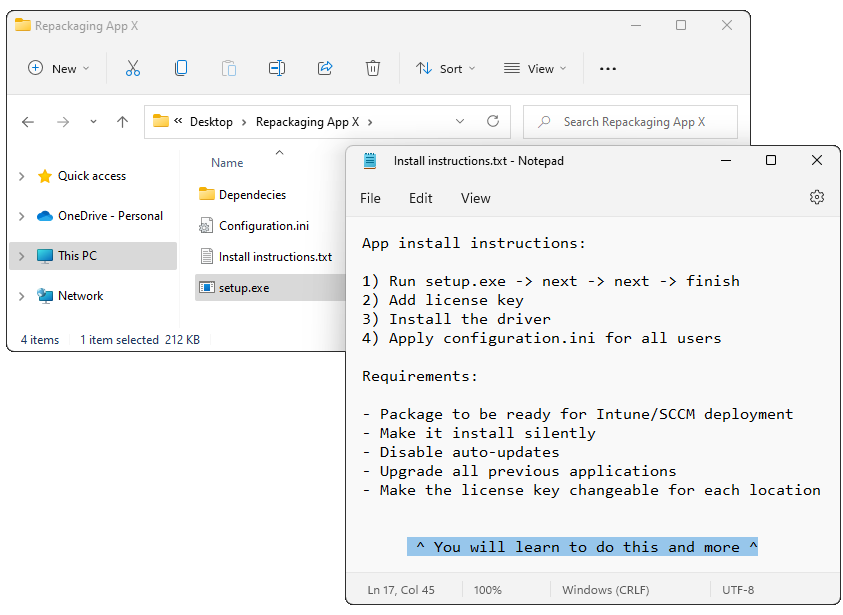
Key outcomes
After completing this course, you’ll:
Learn how to package any application for silent installation in the Microsoft Windows OS enterprise environment.
Learn the application packaging framework that will help you package any application for enterprise needs.
Know specific tricks and tips that would otherwise take you a long time to uncover on your own.
Get access to a private application packaging community – the Master Packager team and other industry experts who’ll help you even after you’ll complete the courses.
Certificate – our issued certificate verifies you have all the knowledge to become a Master Packager.
Benefits of becoming a Master Packager
Save a year’s worth of time learning on your own
Become more in-demand as an IT industry expert
Save money for the business
Lowered risk for downtime
Reduced IT ticket count
Increased security and app control
Faster and easier app maintenance
Meet your instructor
Edijs Pērkums
I started my career in the application and desktop deployment field in 2013. Working with a highly professional and motivated team I became an expert in application packaging and mass enterprise deployments.
I mastered thousands of complex application and configuration requests from businesses in healthcare, oil & gas, and banks requiring the highest quality and error-free packages with SLAs measured in hours not days.
However, my knowledge came at a cost – time. But this doesn’t have to be your case too.
I’m gathering my experience in this one course so you and your team can save time and money.

Who this course is for
IT admins
Beginner application packagers with no to little packaging experience. Ones who work with application packages only from time to time but are expected to deliver the same quality packages as professionals do.
IT pro
Specialists with some knowledge in application packaging who want to level up their knowledge, work quality and speed.
Application packagers
Experts who seek new insights and little-known tips and tricks.
Course overview
Day 1 - Foundations
Fundamentals
You’ll learn fundamentals of Windows OS, applications. Basics of application packaging including benefits and available packaging types and technologies.
Master Packager Framework
We will reviewal our framework that we have polish after packaging thousands of high-quality apps. This framework will show how to choose the right packaging strategy to save time and make professional and secure apps.
Getting ready to package
We will together set up your perfect work environment. You will learn how to organize your work and download all the tools necessary to package apps.
Day 2 - Packaging
Vendor deployment solutions
We will show different packaging examples where it is required to use vendor deployment solution. You will learn how to find silent switches for undocumented apps. We will show how to do Process Monitor to find any app configuration and how to use it the packaging process.
Repackaging
You will learn how repackaging works, typical enterprise requirements, when not repackage and show why Auto IT and PSAppDeployToolkit is not a repackaging tools.
We will go through real life examples of repackaging process together. You will learn when and how you can automate repackaging process.
Everything about MSI
You will learn how MSI works, what are it’s benefits and where it is lacking.
Deep dive into MSI tables and functionality. We will touch on all the important aspects of MSI, including Custom Actions, App Search, Upgrade, Files, Drivers, Properties and a lot more.
Day 3 - Customization
Configuration
We will show how application configuration should be handled during packaging and what approaches can be used to configure applications properly in enterprise environments.
Wrapping
We will go through A to Z about how to work with PSAppDeployToolkit and what tools you should use with it.
Upgrade
You will learn how to properly handle application upgrades and version changes, ensuring smooth updates and avoiding conflicts between application versions.
Day 4 - Quality
Testing
You will learn how to test application packages to ensure quality.
Troubleshooting
Here we will show ways how to read MSI errors and where to look for app logs, how to read them and fix issues.
Day 5 - Packaging Apps
Packaging your applications
At day 5, we spend time packaging your and our chosen applications to show how to use your fresh skills into real-life packaging tasks.





Details
- 5 days
- 4 hours per day
- Learn how to package any Win32 application
- Learn the Master Packager packaging framework
- Know specific tricks and tips to do it faster than others
- Increase your Windows OS and app knowledge skillset
- Get session recordings after the course
- Get access to a private application packaging community to ask questions even after the course
- Access to our direct e-mail support to ask packaging questions for a minimum 2 years
- Certificate proving you have finished the course
- 10% discount for Master Packager Suite Pro renewals for the next 2 years
Date and Time
⚠️ Next workshop dates are not set yet. Register to get notified when the next dates are decided on.
Price
2199.99 EUR
2599.99 USD
Frequently Asked Questions
- DO I NEED PREVIOUS EXPERIENCE?No. This course will show you everything from foundation up to specific cases for experts.
- DO I NEED THE MASTER PACKAGER PRO SOFTWARE TO JOIN COURSES?No. The course is designed to get 100% value in becoming Master Packager while using any packaging software. If you do not own any packaging software we will provide you with a Master Packager Pro trial.
- I HAVE MORE QUESTIONSPlease email the instructor at toms.knostenbergs@masterpackager.com. He will be happy to answer any other specific questions you may have.