
JSON Schema for Master Packager Dev
By referencing this schema, editors can provide real-time validation, structure enforcement, and context-aware documentation. This eliminates the need to constantly switch between the code editor and documentation to verify property names or value types.
Schema Location
URL: https://www.masterpackager.com/support-master-packager-dev/mpdev-schema.json
Key Benefits
-
IntelliSense & Auto-complete: The editor suggests available properties and values as you type.
-
Real-time Validation: Configuration errors, typos, and incorrect value types are flagged immediately.
-
In-Editor Documentation: Hovering over a property displays its description and usage rules directly in the interface.
Configuration
Visual Studio Code
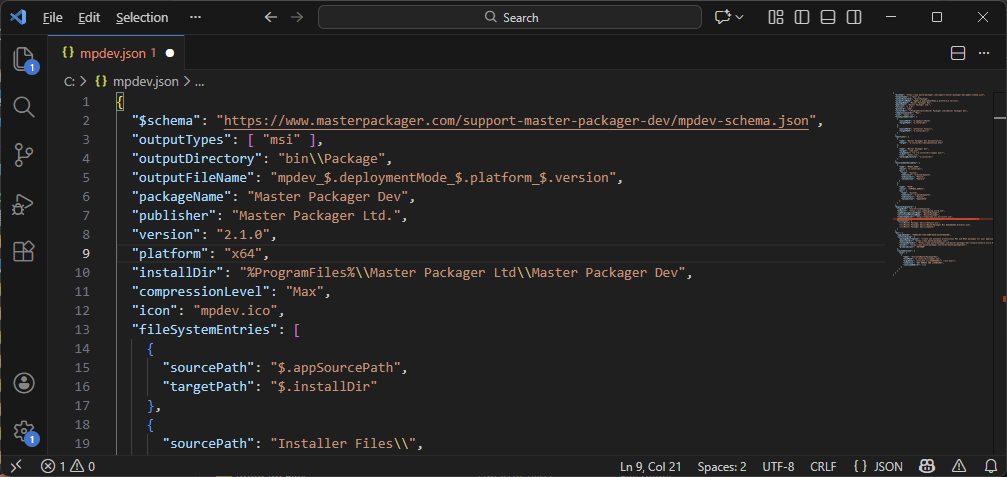
Add the $schema property to the top of your JSON file as showed in the picture:
Visual Studio
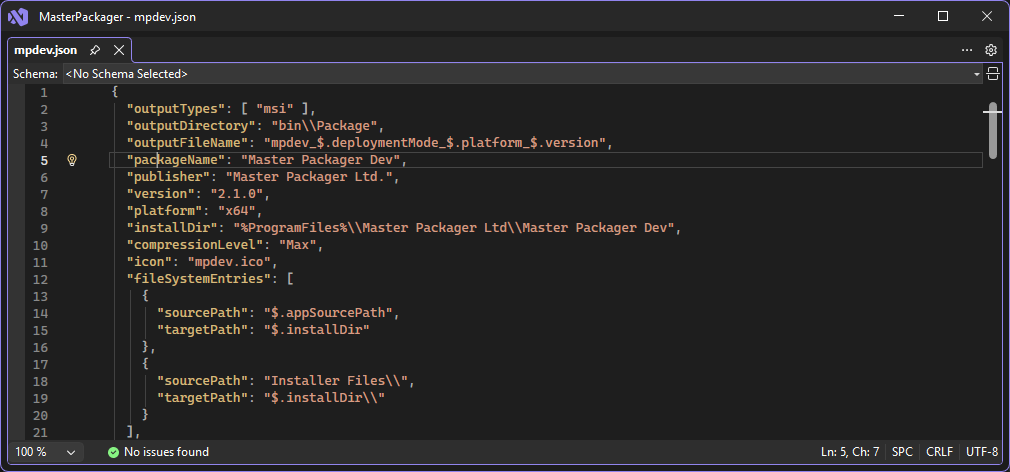
Visual Studio supports schema validation for open JSON files by entering the Schema in top textbox called Schema: < No Shema Selected >
AI Assistance
When generating configuration files using AI tools, providing the schema allows the model to generate syntactically correct and up-to-date code.
Usage: Include the schema URL in your prompt to strictly define the output structure.
Example Prompt:
“Write a Master Packager Dev configuration file. Use the rules defined in this schema: https://www.masterpackager.com/support-master-packager-dev/mpdev-schema.json. The package should install to ‘ProgramFiles’ and create a shortcut in ProgramMenu folder.”