
Add registry values from .reg file
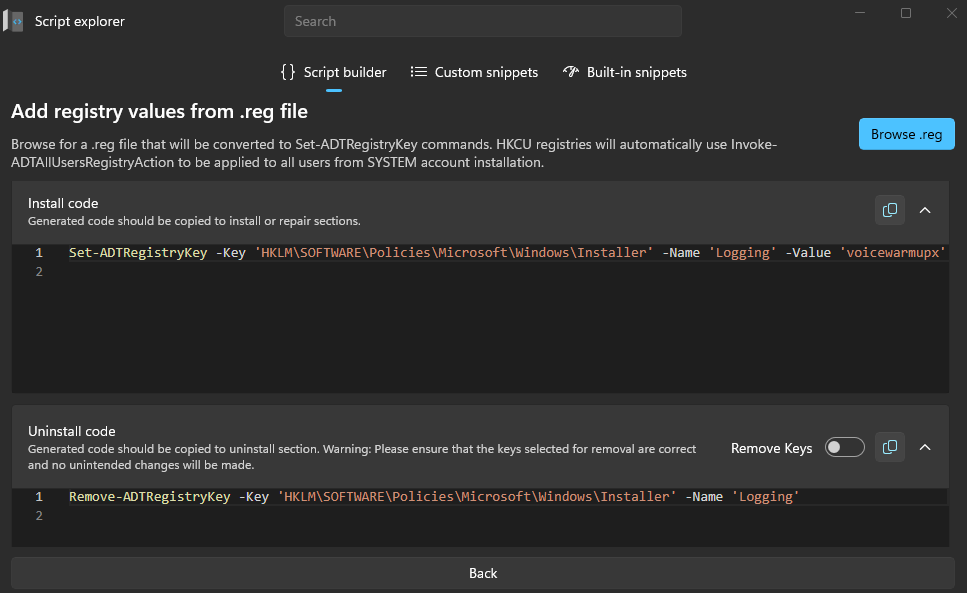
Converts .reg files into PowerShell commands for easier registry deployment, automatically generating installation and removal code for PSAppDeployToolkit scripts.
This feature allows converting .reg files into PowerShell commands used in PSAppDeployToolkit scripts. It eliminates the need to manually write registry manipulation commands by automatically generating them based on the imported file.
How it works
- Click Browse .reg and select a registry export file from your system.
- Master Wrapper will parse the
.regcontent and automatically convert it intoSet-ADTRegistryKeycommands for installation andRemove-ADTRegistryKeycommands for uninstallation. - If the registry keys are under
HKCU, the tool will useInvoke-ADTAllUsersRegistryActionto ensure that the changes apply to all user profiles during a SYSTEM-level installation.
Generated code
- Install code: Appears in the top code window and contains
Set-ADTRegistryKeycommands. This is meant to be copied into the Install or Repair section of the deployment script. - Uninstall code: Appears in the bottom code window with
Remove-ADTRegistryKeycommands. This should be added to the Uninstall section of your script to clean up registry keys if needed.