
Summary information
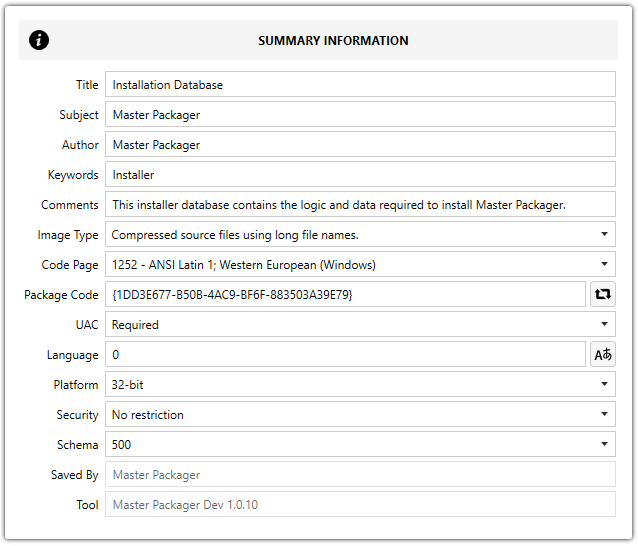
Summary information contains properties that are used by the installer to install the MSI package and information about the package that can be viewed through Microsoft Windows Explorer.
-
Title
Sets MSI Summary Information Title that will show up under Properties > Details. -
Subject
Sets MSI Summary Information Subject that will show up under Properties > Details. -
Author
Sets MSI Summary Information Author that will show up under Properties > Details. -
Keywords
Sets MSI Summary Information Tags that will show up under Properties > Details. -
Comments
Sets MSI Summary Information Comments that will show up under Properties > Details. -
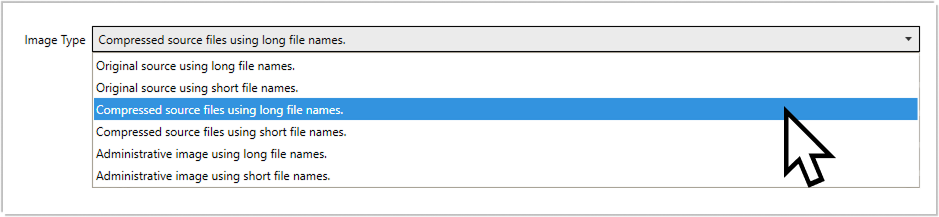
Image Type
-
Original source using long file names
-
Original source using short file names
-
Compressed source files using long file names (Default)
-
Compressed source files using short file names
-
Administrative image using long file names
-
Administrative image using short file names
-
Code Page
Numeric value of the ANSI code page used for any strings that are stored in the summary information. -
Package Code
Unique GUID that defines this specific application MSI installation and is not stored in the MSI Property table but in the MSI Summary Information stream.
💡 Every time a new MSI is created using Master Packager, a unique Package Code GUID is generated.
-
UAC
User Account Control (UAC) sets whether the user will see a UAC popup and be able to enter admin credentials to continue installing the MSI or receive an error message about insufficient privileges. -
Required (Default) – Users will receive a UAC popup.
-
Not Required – Non-admin users will see an error message and will not be able to install the MSI without starting the MSI from an elevated process.
-
Language
Sets Summary Information language. 0 (Default) -
Platform
Sets which devices the MSI can install on. -
Arm
-
Intel (Default) – Use this for Windows OS x86. This will still allow installation on Windows x64 architecture OS.
-
Intel64
-
x64 (Default) – Use this for Windows OS x64. This value will not allow MSI installation on Windows x86 architecture OS.
-
Security
Sets security restrictions for MSI installation. -
No restriction
-
Read-only recommended (Default)
-
Read-only enforced